
Most people who use Microsoft Office today assume that “Quick Print” has always been part of the product. It feels like one of those features that simply existed from the beginning. But the real story is far more interesting—and I’m one of the few people who can tell it from firsthand experience.
- Before the Ribbon: Two Different “Prints” in Office 2003
- Joining the Office 2007 Beta as a Microsoft MVP
- The Moment the Name Was Coined
- The English Term Came Later—Years Later
- Why This Matters
- A Small Contribution That Endured
Before the Ribbon: Two Different “Prints” in Office 2003
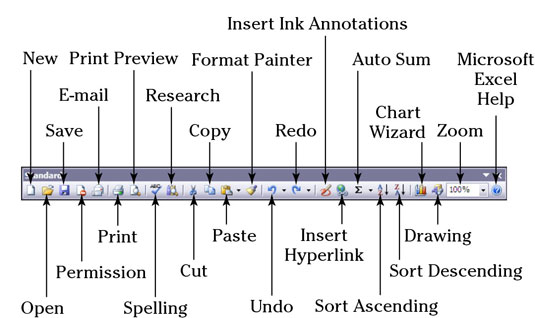
Before Office 2007 introduced the Ribbon, Office relied on the classic toolbars. On the Standard Toolbar, the printer icon—simply labeled Print—performed an immediate print with no dialog. In behavior, it was essentially the ancestor of what we now call Quick Print.
Meanwhile, the File menu’s Print command opened the full print dialog, allowing users to choose printers, page ranges, and settings.
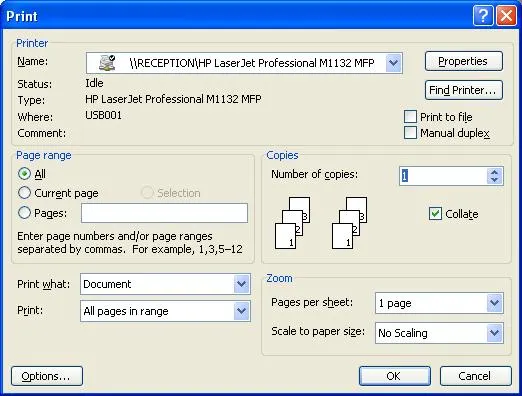
These two commands were intentionally distinct: one was fast and direct, the other was configurable and formal.
Joining the Office 2007 Beta as a Microsoft MVP
When Office 2007 was being developed, I participated in the beta program as a Microsoft MVP. For readers unfamiliar with the term: Microsoft MVP (Most Valuable Professional) is an award given to community experts who contribute technical knowledge, provide feedback, and help improve Microsoft products.
About the NDA
As part of the invitation-only technical beta, I signed an NDA—standard practice at the time. These NDAs cover unreleased features and pre-release UI, but they expire once the product ships. Office 2007 has been publicly available for nearly two decades, so sharing historical details today is fully permissible.
This beta program was exactly where the name “Quick Print” was born.
The Moment the Name Was Coined
The exchange went something like this. In a private Connect thread, another MVP noticed the label 「簡易印刷」(literally “Simplified Print”). and posted,
“There’s a command called ‘簡易印刷’ here—what is that supposed to be? That term already exists in Japanese Office for a completely different feature.”
In Japanese Office, the term “簡易印刷” traditionally refers to draft‑quality or simplified printing options—features like grayscale or economy mode that still exist today.
I didn’t understand what he meant and replied, “Wait, what do you mean?”
He then clarified in the thread that the command was the equivalent of what we now call Quick Print—an immediate print with no dialog.
As soon as I read that explanation, I thought of “Quick Launch,” the shortcut area next to the Start button in Windows Vista, and suggested renaming it to 「クイック印刷」 (“Quick Print”).
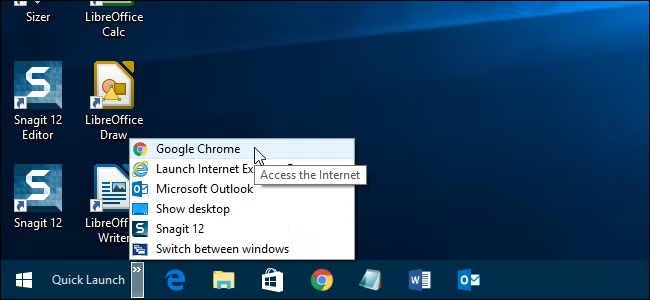
And that part I can state with certainty: the very next Japanese beta build adopted the name 「クイック印刷」.
I was surprised when another MVP later commented to me, “Your suggestion was accepted in the very next build.”
That was the moment I realized: I had just named a feature in Microsoft Office.
The English Term Came Later—Years Later
Here’s the part most people don’t know:
Office 2007’s English UI did not use the term “Quick Print.”
Even though the icon existed in the Quick Access Toolbar, the English label was not:
- “Print”
- nor “Print (no dialog)”
In early Ribbon builds, the command name was inconsistent and sometimes displayed only internal placeholder text.
The English term “Quick Print” appeared later—around Office 2010, when the Backstage View was introduced—and became fully standardized in Office 2013.
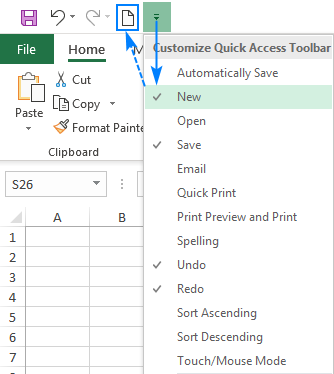
In a rare reversal of the usual localization flow, the English UI later adopted the term that first appeared in the Japanese build.
In other words:
- The Japanese UI adopted “クイック印刷” first
- The English UI followed years later
- And the name I coined became the global standard
Today, the term has been used officially for nearly 20 years.
Why This Matters
When the Ribbon debuted, Microsoft was still figuring out how to name and categorize commands in a way that matched the new UI philosophy. The absence of “Quick Print” in the English build wasn’t an oversight—it was simply part of the transition.
But the fact remains:
The name I proposed in the Japanese beta program eventually became the official English term used worldwide.
This is a rare case where a localization-side suggestion influenced the core English UI and became a global standard.
A Small Contribution That Endured
It’s a tiny piece of Office history, but it’s mine. And yes—after two decades, I think I’ve earned the right to brag a little.
Two decades later, I finally decided to share this story—not just as a memory, but as a piece of history that I’ve come to understand more clearly through revisiting it and learning from my conversations with Copilot.

- Read more
Write a comment